Outloop's vision for AI-native agencies
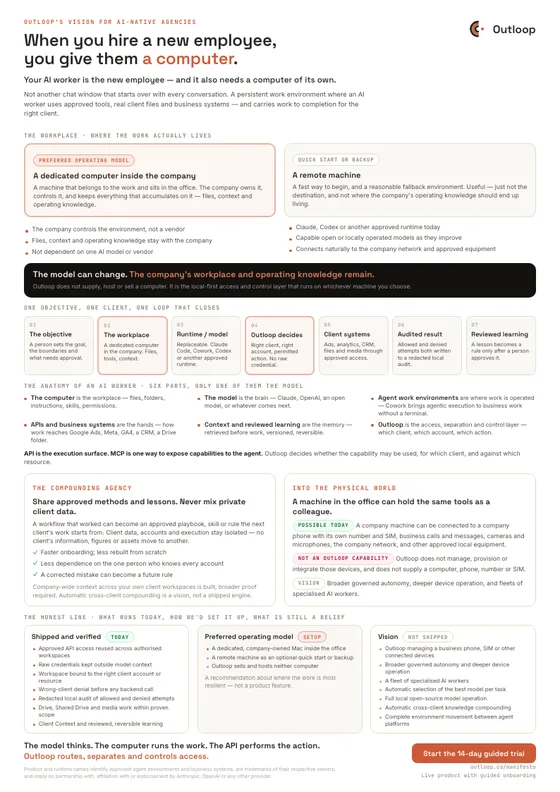
When you hire a new employee, you give them a computer. Your AI worker is the new employee — and it also needs a computer of its own.
Not another chat window that starts over with every conversation. A persistent work environment where an AI worker uses approved tools, real client files and business systems — and carries work to completion for the right client.

A dedicated computer inside the company — the persistent workplace of the AI worker.
Last updated:
In short
An AI worker needs a workplace, not just a better model.
Give an AI worker an objective and it needs somewhere to do the work: files, instructions, approved tools, and access to real client systems. We think that workplace belongs on a dedicated computer the company owns, inside the office — a remote machine is a fine quick start, but not the destination. Outloop is the access and control layer for that environment: which client, which account, which action, and never the raw credential.
01 — The shift
Not a chat. A worker.
A chatbot answers and stops. You are still the one who opens the next system, selects the correct account, moves the files across, and decides what happens next.
An agent receives an objective, plans the work, uses the tools it has been approved to use, and continues until it reaches a result — or until it hits a boundary that needs human approval.
The important difference is not only how intelligent the model is. It is whether the agent has a stable workplace and governed permission to act inside real business systems — and whether anyone can say exactly what it was allowed to do.
02 — The workplace
The preferred workplace is a dedicated computer inside the office.
A computer matters not for the hardware but for what it holds — and who holds it. A workplace for an AI worker means:
- Files and client folders
- Instructions and skills
- Approved tools
- Approved API access
- Context and reviewed learning
- Permissions, audit, and approval gates
A dedicated computer inside the company
A machine that belongs to the work and sits in the office — not a person's laptop between meetings. The company owns it, controls it, and keeps everything that accumulates on it.
A remote machine
A fast way to begin, and a reasonable fallback environment. Useful — just not the destination, and not where the company's operating knowledge should end up living.
The model can change. The company's workplace and operating knowledge remain.
Why we land on the office machine:
- The company controls the environment, not a vendor
- Files, context and operating knowledge stay with the company
- The agency is not dependent on one AI model or vendor
- Claude, Codex or another approved runtime can be used today
- Capable open or locally operated models can be introduced as they improve
- The machine connects naturally to the company network and approved local equipment
- The model can change without rebuilding the whole operating environment

Outloop does not supply, host or sell a computer. It is the access and control layer that runs on whichever machine you choose — and if you want the full decision framework rather than our preference, we wrote one: cloud agents vs dedicated machines.
A stack of tools, or one worker who can use them.
| Operating model | Today: a collection of separate tools | The new way: one worker with a work environment |
|---|---|---|
| 01 | One tool for copy, another for images, another for video | A capable model that understands the objective and plans the work |
| 02 | One tool for campaign optimisation, one for reports | Approved access to the business systems that client uses |
| 03 | A separate interface for every marketing channel | A workspace that knows which client it belongs to |
| 04 | Context and history scattered across all of them | Context and reviewed learning that stay with the company |
| 05 | A separate subscription and setup for each new need | A dedicated computer inside the company, holding the work |
| 06 | A person acting as the integration layer between them | Humans setting the goals and approving the sensitive actions |
The bottleneck is no longer how clever the model is. It is that a person is still standing in the middle of every workflow, holding the keys.
03 — The anatomy
Six parts make an AI worker. Only one of them is the model.
Everyone is building the brain. The parts that decide whether it can do real client work — a place to work from, memory, and a layer that governs access — get far less attention.
- 01
The computer is the workplace .
Files and client folders, instructions and skills, approved tools, permissions. A dedicated machine inside the company, holding the work and the operating knowledge — the part that does not get replaced when something better arrives.
- 02
The model is the brain .
It reasons, plans, writes, analyses. Claude, OpenAI, an open-source model, or another model the company selects later. It changes fast — so nothing underneath it should depend on one model staying best.
- 03
Agent work environments are where the work is operated .
Claude Code and Codex for people comfortable in a terminal. Claude Cowork brings that same agentic execution to business and knowledge work without asking anyone to operate a terminal — files, instructions, tools and workflows instead of a chat window. Entry points, not the centre of the vision.
- 04
APIs, browsers and business systems are the hands and the tools .
How work actually reaches Google Ads, Meta, GA4, a CRM, a Drive folder, a media root. The stable execution surface a provider supports for reading data and performing actions.
- 05
Context and reviewed learning are the memory .
Company rules, client-specific knowledge, and lessons a person has approved. Retrieved before work starts, versioned, and reversible — never model training and never a silent rewrite.
- 06
Outloop is the access, separation and control layer .
Which client, which workspace, which account or resource, which runtime, which action — and whether it can proceed without exposing the raw credential.
The model can change. The company's workplace and operating knowledge remain.
Product and runtime names identify approved agent environments and business systems. They are trademarks of their respective owners, and their appearance implies no partnership with, affiliation with, or endorsement by Anthropic, OpenAI, or any other provider.
04 — The loop
One objective, one client, one loop that closes.
Watch the same lane run three times: an approved request that finishes, a wrong-client request that is stopped and still audited, and a model swap — where the runtime changes and the workplace, the audit and the learning stay exactly where they were.
Illustrative model, not a recording of a customer account. Runtime names are shown to identify approved agent environments — no partnership or endorsement is implied.
- The objective — a person defines the work, the boundaries, and what needs approval.
- The workplace — a dedicated computer inside the company, the preferred operating model. The files, context, tools and operating knowledge stay here.
- The runtime and model — replaceable. Claude Code, Claude Cowork or Codex today; an approved open model is a stated vision, not a shipped capability.
- The access decision — Outloop resolves the right client, the right account or resource, and the permitted action, without exposing the raw credential.
- The client systems — approved work reaches Google Ads, Meta, Drive, GA4 or another approved business system.
- The audited result — allowed and denied attempts are both written to a redacted local audit.
- Reviewed learning — a lesson becomes a context revision only after a person approves it, and it can be rolled back.
- A request naming the wrong client is denied at the access decision with RESOURCE_ID_NOT_ALLOWED, before any backend call, and the denial is audited.
- The model can be swapped for another approved runtime while the workplace, the audit and the reviewed learning stay in place.
05 — Outloop's role
Humans keep control. They just stop being the integration layer.
The point is capacity: more client work finished, without a person pasting credentials or remembering which account belongs to which client. Everything below is what makes that safe enough to do at all.
Humans
define the objective, the boundaries, and the approvals.
AI workers
perform the work inside those boundaries.
Nobody
hand-feeds a credential to get it started.
Outloop is not an AI model, a password vault, or a collection of connectors.
- Not an AI model
- It does not reason or write. It decides what an agent is allowed to do.
- Not a password vault
- It sits above your vault — 1Password, Infisical, Doppler, Keychain — and never replaces it.
- Not a collection of connectors
- Connecting an agent to a tool is not deciding what it may do with that tool, for which client.
What Outloop enforces, on every request
It is the local-first access and control layer that lets approved agents work across clients, accounts, files and business systems — while these stay true:
- The correct tenant and workspace
- Resolved from where the request came from, not what it claims.
- The correct client account or resource
- The one account, property or folder that workspace may touch.
- The approved runtime
- Which agent environment is asking.
- The allowed host and authentication method
- Approved hosts only; authentication applied host-side.
- The permitted action, and what needs approval
- Read and write are separate decisions.
- No raw credential exposure
- The credential is used on the wire, never handed over.
- Wrong-client denial before backend access
- Refused before any call is made.
- Redacted audit of allowed and denied attempts
- Both outcomes are written locally.
- Separation of client data and execution
- One client context at a time.
None of this removes the human. It removes the manual handoff, and keeps review where the work is sensitive. See the security model for how it is implemented, or a multi-client walkthrough for what a denied request looks like.
06 — The compounding agency
In most agencies, what works stays in one person's head.
Something works for one client. Applying it to the next one means explaining it, setting it up again, and executing it by hand again — and if the person who worked it out is busy, it does not happen at all.
When the work runs in an environment the company owns, a workflow that worked can become an approved playbook, a skill, a rule, or an operating principle that the next client's work starts from. The method is the asset. It stays with the company.
Share approved methods and lessons. Never mix private client data.
- Client data, accounts and execution stay isolated
- No client’s information moves to another client
- No performance figures or creative assets travel
- Promoting a method to company level is a deliberate human act
Learn the pattern across the agency. Keep every client's data, accounts and execution isolated.
What the agency gets
- Onboarding a new client starts from a proven method instead of a blank folder
- Less work rebuilt from scratch for every client and every channel
- Less dependence on the one person who knows every account
- A corrected mistake can become a rule the next run has to follow
- More execution capacity across clients and channels
- More consistent delivery, and gross margin that improves with scale
Capacity is the reason an agency does this. It does not mean serving more clients with nobody reviewing the work — approval stays where the action is sensitive.
Client Context and reviewed learning are live
live· compounding across clients is not
visionCompany-wide context across many of your own client workspaces is built, with broader proof still required. A method spreading across a book of clients on its own is a direction, not a shipped engine. How the mechanism actually works: context, memory and the human review lifecycle.
07 — What changes for software
SaaS does not disappear. Its role changes.
In the old model, a product was built around an interface a person had to learn and operate. That is still where most software value is captured today.
We think more systems will expose what they can do through APIs, MCP servers, connectors, actions, data services and model endpoints — surfaces an agent can operate directly. Human interfaces keep mattering, particularly for configuration, oversight, exceptions and approval. What moves is the routine execution: the part where someone opens ten screens to complete one task.
API is the execution surface. MCP is one way to expose capabilities to the agent. Outloop decides whether the capability may be used, for which client, and against which resource.

08 — Into the physical world
A machine in the office can be given the same tools as a colleague.
This is where the "computer" stops being only a metaphor for an environment. A dedicated machine sitting in the company can be connected to real equipment — the same way you would hand a new employee a phone, a number, and a desk on the network.
What a company machine can already be connected to
possible today- A company phone, with its own number and SIM
- A dedicated line that belongs to the role, not to someone’s personal handset.
- Business calls and messages
- The channels a client actually reaches the company on.
- Cameras and microphones
- Approved capture equipment for real production work.
- The company network
- Wired into the same network as the rest of the company’s equipment.
- Other approved local devices
- Storage, capture and studio equipment already sitting in the office.
This is not a claim that a remote machine cannot handle telephony or devices — plenty can. It is that a machine physically present in the company is the more natural place to attach physical equipment, and the company already controls it.
What Outloop does not claim to do
not an Outloop capabilityOutloop does not manage, provision or integrate those devices. It does not supply a computer, a phone, a number or a SIM. What Outloop governs is approved API, account, file and media access — and a device being physically attached to the machine does not change what an agent is allowed to do with it.
Where we think it goes
vision- Broader governed autonomy over connected equipment
- Deeper device operation, under policy and approval
- A fleet of specialised AI workers rather than one
An AI worker may come to hold the same communication channels and physical tools a human employee is given — under permissions, audit, and human control.
09 — The honest line
What runs today, how we'd set it up, and what is still a belief.
A manifesto is only worth reading if you can tell which parts are already true. So here are the three lines, drawn in public and kept apart.
Shipped and verified
today-
Approved API access, reused across authorised workspaces
live -
Raw credentials kept outside model context
live -
Workspace bound to the right client account or resource
live -
Wrong-client access denied before any backend call
live -
Redacted local audit of allowed and denied attempts
live -
Drive, Shared Drive and media work within proven scope
live -
Client workspace Context, retrieved before work and versioned
live -
Learning a person reviews, and can reverse
live -
Company-wide context across many client workspaces
built, broader proof required
The preferred operating model
how to set it up-
A dedicated, company-owned computer inside the office
preferredThe preferred foundation. The company controls the environment, and the files, context and operating knowledge stay with the company when the model changes.
-
A remote machine as a quick start or backup
optionalA fast way to begin, and a reasonable fallback environment. Useful — just not the destination.
-
Outloop sells and hosts neither of them
always trueWe do not supply, host or rent a computer. Outloop is the access and control layer that runs on whichever machine you choose.
This column is a recommendation, not a product feature. Outloop runs on whichever machine you choose — the recommendation is about where the work is most resilient.
Where we think this goes
not shipped-
Outloop managing devices, and deeper governed autonomy
visionA machine in the office can already have a company phone, number and SIM, cameras and the company network attached. Outloop natively managing those devices — and operating them under policy — is not something we claim today. Nor is a fleet of specialised AI workers.
-
Automatic selection of the best model per task
visionAn agent choosing approved models for reasoning, image, video and analysis, and running capable open models locally. A belief about where this goes, not a shipped router.
-
Automatic cross-client knowledge compounding
visionAn approved method spreading across a book of clients on its own. It will never mean moving one client’s data, accounts or assets into another’s workspace.
-
Moving a whole workspace between agent platforms
visionCarrying safe instructions, skills and workspace context between platforms without moving raw secrets. Prepared direction — never a claim that memory, skills or runtime config move today.
Nothing in this column is sold, priced, or promised on a date. It is written down so you can hold us to the difference.
10 — The proof
This is what the manifesto looks like in real agency work.
A prediction is worth very little on its own. These are the workflows where the argument stops being theoretical.
Agents across many clients
What running agents across a book of clients actually looks like, and where the access breaks first.
Read itThe system, end to end
What Outloop actually is today — the company-controlled Mac, approved access, files, audit and reviewed learning.
Read itA wrong-client request, denied
The multi-client walkthrough: the right account served, and the wrong one refused before any backend call.
Read itSandboxed agent workflows
Why a sandboxed agent stops mid-workflow, and what changes when access is granted properly.
Read itThe one-pager
Take the whole argument with you.
The complete manifesto on one A4 page — the AI worker and its computer, the anatomy, what compounds and what stays isolated, and the honest line between what runs today and what is still a belief. Useful for a partner meeting or a leadership conversation.
PDF · A4 · 421 KB · no form

Why I'm building this
We ran an agency. The agent was never the problem.
Every workflow we built worked beautifully in a demo and then stalled in the same place: the moment it needed access to a real client's systems. Someone had to stop, find a key, paste it somewhere, and remember which account belonged to which client.
We were not missing a smarter model. We were missing the layer that decides what an agent is allowed to do, for whom — so the work can continue without a person handing over credentials, and without the wrong client's account ever being touched.
That layer is what we build. The rest of this page is where we think it leads.
Adam Argaman
Founder & CEO, Outloop
The vision
One person will manage one AI worker — and later, a team of them.
Each with a dedicated workplace, a replaceable model, approved tools and APIs, context and memory, communication channels, client-specific permissions, and human approval where the action is sensitive. Each client keeps a separate workspace, separate accounts, separate data and separate permissions — and the company keeps control of its own infrastructure and operating knowledge.
- The model
- thinks.
- The computer
- runs the work.
- The API
- performs the action.
- Outloop
- routes, separates and controls access.
Models will change. The company's computer, knowledge and infrastructure will remain.
Live product with guided onboarding · Keys stay local · Cancel anytime