



For agencies running AI agents across many client accounts

Run agents across every client — without handing over API keys.

One approved access setup, reused across every client workspace.

Take me out of the damn API loop.

Agencies run agents across many clients, tools, and workspaces. Outloop gives each agent tenant-aware approved access — it requests an action, the local broker uses the right client's credential, and the raw key never reaches the agent.

No copied keys. No wrong-client calls. Every action audited.

Create your trial. Download the Mac app. Run your first API proof locally.

Guided setup included · API keys stay local · Cancel anytime

outloop client access vault stays locked

One access setup Workspace approved Runtime allowed secret_exposed:false

Reuse approved API access across the runtimes your team already uses

One approved access layer for Cowork-style sandboxes, Claude Code, Codex, Hermes, and OpenClaw — without rebuilding setup for every platform.

One credential. The right workspace. Any approved agent runtime. secret_exposed:false

Independent tools. Names and logos belong to their respective owners; Outloop is not affiliated with or endorsed by these projects.

Use case

Outloop for AI agencies

Last updated:

In short

Outloop lets AI agencies run agents across many client accounts without handing over API keys.

Agencies run agents across multiple clients, tools, and workspaces. Outloop gives each agent tenant-aware approved access: the agent requests an action, the local broker uses the right client's credential on the wire, wrong-client calls are blocked by policy, and every action is logged to a redacted per-client audit.

Agency workflow proof

Built from real agency API workflows.

Outloop was built while running real client-agent workflows across ads, CRM, data, file, reporting, and automation APIs.

The lesson was simple: agencies don't need another place to paste keys. They need one approved access layer that lets agents work across client workspaces safely.

Explore agency API workflows
Google Ads Campaign checks
Meta Ads Account reporting
Merchant Center Product feed review
Airtable CRM & ops data
Google Drive Client asset folders
Gmail Inbox workflows
Apify Data collection
Firecrawl Web research

Example services shown for workflow context. Logos and names are trademarks of their respective owners; no official integration or endorsement is implied.

The multi-client bottleneck

When you run agents for many clients, the credential problem multiplies. Every new client means more keys in more places, and the agent keeps stopping to ask a human to paste one. The risks stack up fast:

  • You're stuck in the loop hand-feeding API keys to agents.
  • Secrets sprawl across .env files, chats, and project folders.
  • An agent can act on the wrong client's account.
  • Workflows fall back to fragile browser sessions when API access is too painful to set up.
  • Agents write the deliverable, but a human still uploads, renames, and files it in the client's Drive.
  • There's no clean audit trail of what ran for whom.

How Outloop fits

Connect a client workspace once. After that, agents keep working — without a human handing over keys:

  • Secrets stay local — Outloop cloud never receives raw API keys.
  • Agents request actions, not raw keys.
  • Wrong-tenant access is blocked by policy.
  • Keep your existing vault. Outloop controls runtime access.

The longer argument for why agency work is heading this way is in the AI Agency Manifesto.

  1. 01

    Agent request

    The agent asks for an approved action or alias — not a raw key.

  2. 02

    Policy & tenant check

    Outloop checks project, tenant identity, and runtime policy before anything runs.

  3. 03

    Local broker

    On approval, the local broker uses the credential on the wire to perform the call.

  4. 04

    Redacted result

    The agent receives a sanitized, non-secret result. Raw values never enter its context.

  5. 05

    Audit log

    Every attempt is written to a redacted local audit — decision, tenant, service.

The agent never sees the credential. A wrong-tenant request is denied at the policy check, before any backend call.

Running a marketing agency specifically? See the dedicated guide for AI marketing agencies — agents across client Google Ads, Meta Ads, Merchant Center, GA4, and Search Console accounts.

Want this set up and running against a real client workflow rather than doing it yourself? Get implementation help — workflow diagnosis, access setup, implementation, and training.

Real workflow · anonymized

Call tracking workflows without plaintext API keys →

How an agent enriches call leads from a call-tracking API with the key injected locally — secret_exposed: false, every request audited.
How it works

How you reuse API access in 3 steps

Add it once. Approve the workspace. Let the agent use it safely.

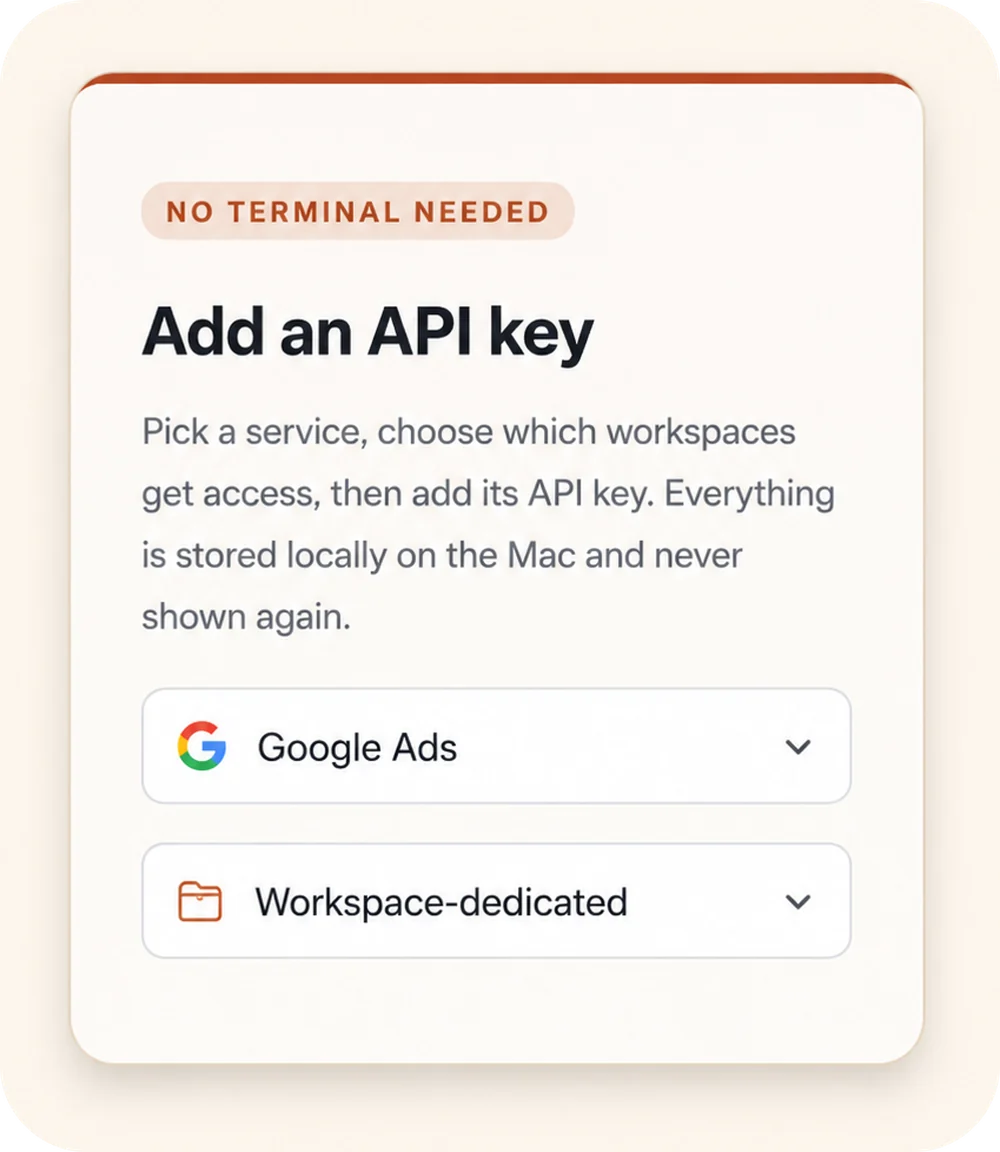
Outloop “Add an API key” panel: a “No terminal needed” badge, a service picker set to Google Ads, and a Workspace-dedicated access selector.
00

Add API access once

Choose a service, select the workspaces that should get access, and store the credential locally on the Mac.

Keys stay local
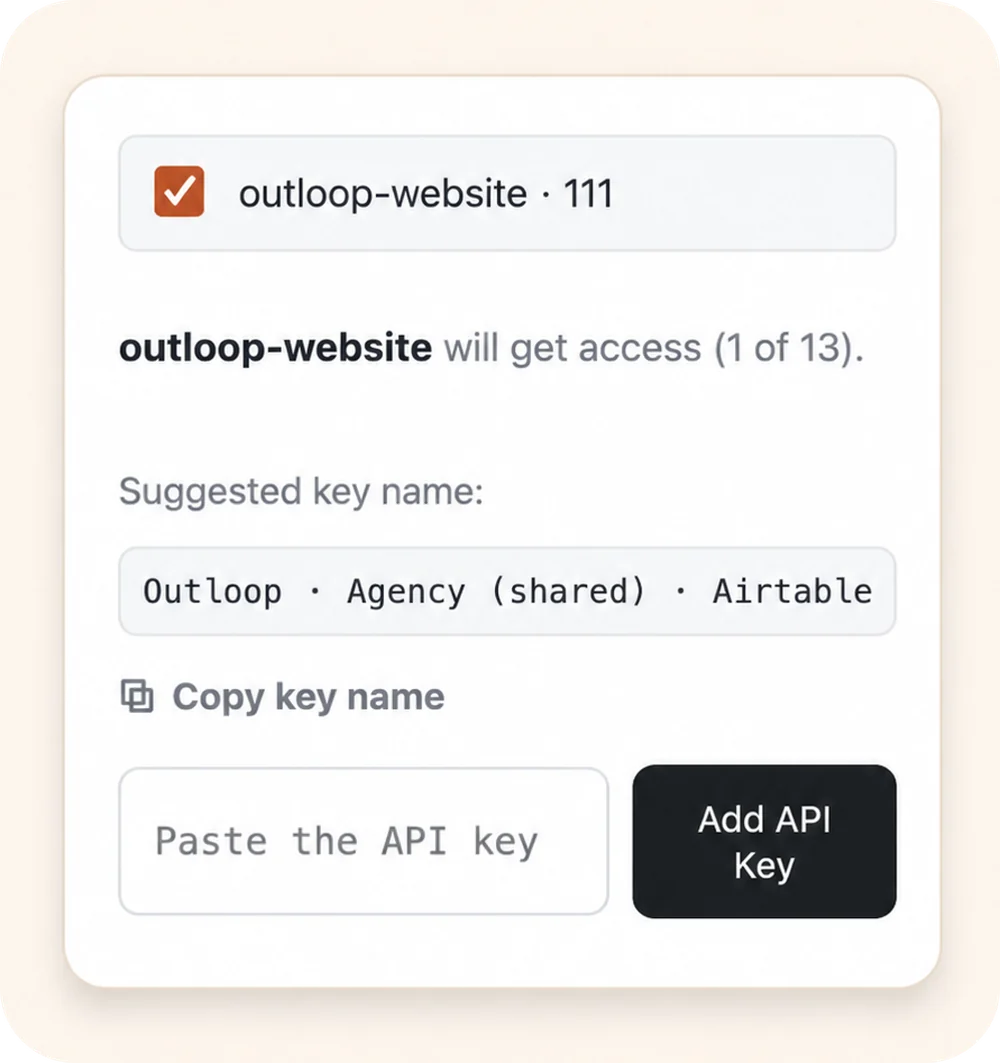
Outloop workspace approval: the outloop-website workspace selected to receive access, with a suggested key name and an empty “Paste the API key” field.
00

Approve the right workspace

Grant access only to the client workspace that should use it. Each workspace stays isolated.

Wrong-client access blocked
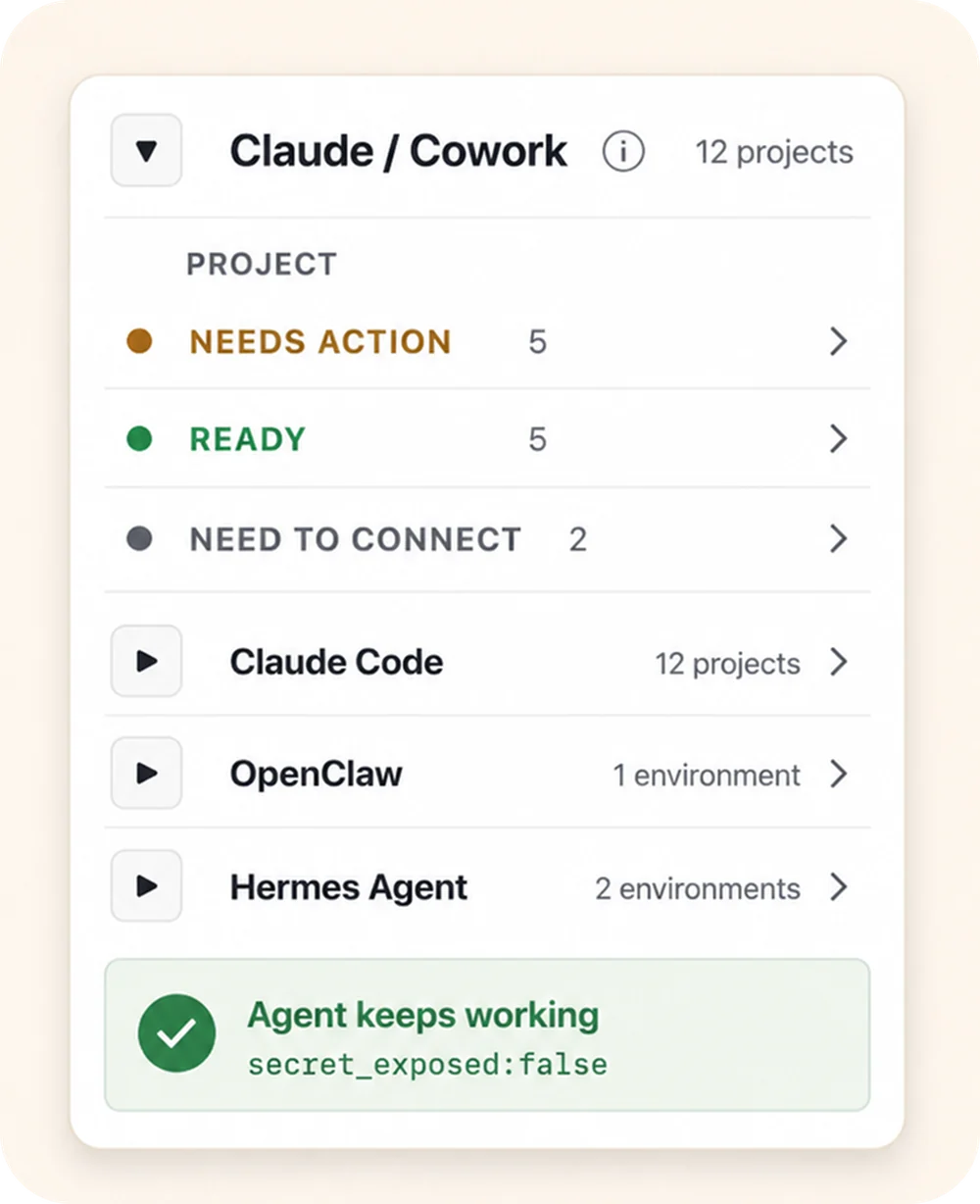
Outloop agent-projects panel: the Claude / Cowork runtime expanded to show per-project status (Needs action, Ready, Need to connect), above the Claude Code, OpenClaw, and Hermes Agent runtimes, with an “Agent keeps working — secret_exposed:false” proof badge.
00

Let agents use approved access

Connect agent projects, then let approved agents request access through Outloop without seeing the raw key.

Agent keeps working secret_exposed:false

Keys stay local Workspaces stay scoped Agents request access, not keys

Keep your vault. Control runtime access.

1Password
macOS Keychain
Infisical
Doppler

Outloop works above Keychain, 1Password, Infisical, Doppler, and other secure backends. It does not replace your vault. It controls which workspace and runtime can use approved access.

  • No API keys uploaded to cloud.
  • No raw key returned to the agent.
  • No .env files required.
  • Wrong-client access is blocked before credential use.

Run agents across every client — safely.

Outloop is available with guided onboarding for AI agencies, operators, and dev shops.

The Mac app is signed with a Developer ID and notarized by Apple; release v1.1.6 was verified on two Macs on 24 July 2026. See the security model, why it's not a vault, or pricing.

Start 14-day guided trial
Frequently Asked Questions

AI agencies — FAQ

Ready to get out of the API loop?

Run more client AI workflows without rebuilding API access every time.

Connect API access once and reuse it across every client workspace — instead of rebuilding setup for each new one.

For agencies and operators managing 5 to 100 client workspaces.